Documentation media
Site identity
The owner-supplied Sorrell Consulting identity uses an arch-and-keystone mark, outlined serif lettering, warm off-white surfaces, dark slate text, and forest-green accents. The local brand stylesheet maps its light/dark palettes to Material. Asset provenance: Sorrell Consulting's brand package, revision b14efbb373844be1118a407c7f94f656cd96d9ab. The documentation retains its system body fonts and Material's documentation layout, navigation, search, and syntax highlighting.
The selected artwork is copied byte for byte into docs/assets/brand/: the horizontal logo and arch mark, their reversed variants for dark backgrounds, the SVG favicon, 16/32px PNG fallbacks, and the Apple touch icon. The logo lettering is outlined, so it requires no font download. Use the horizontal logo on desktop and the arch on narrow screens; preserve their proportions, clear space, and light/dark variants when updating. All assets are served locally, with no runtime dependency on the business website.



The header brand links to sorrellconsulting.com; the adjacent documentation title links to the amends homepage. overrides/partials/header.html adapts Material for MkDocs 9.7.7's header under its MIT license. Check it against the upstream template when upgrading Material so search, palette controls, and navigation keep working.
Light is the default; the optional dark theme uses the official dark palette. Chart.js reads the theme's chart tokens when the palette changes. Inventory uses a solid brand-green line and triangle crossing markers; the threshold uses a dashed ochre line as a documentation-specific supplementary color. Keep text at WCAG AA contrast and meaningful chart marks at least 3:1 against the chart surface when changing these tokens. Check both palettes, mobile navigation, search, code, and chart lifecycle using the documentation checks.
Architecture
architecture.png, architecture.svg, and architecture.mmd describe the same component and transaction boundaries. PNG is the portable rendered illustration; SVG is its scalable source; Mermaid is an editable semantic representation whose renderer may use a different layout.
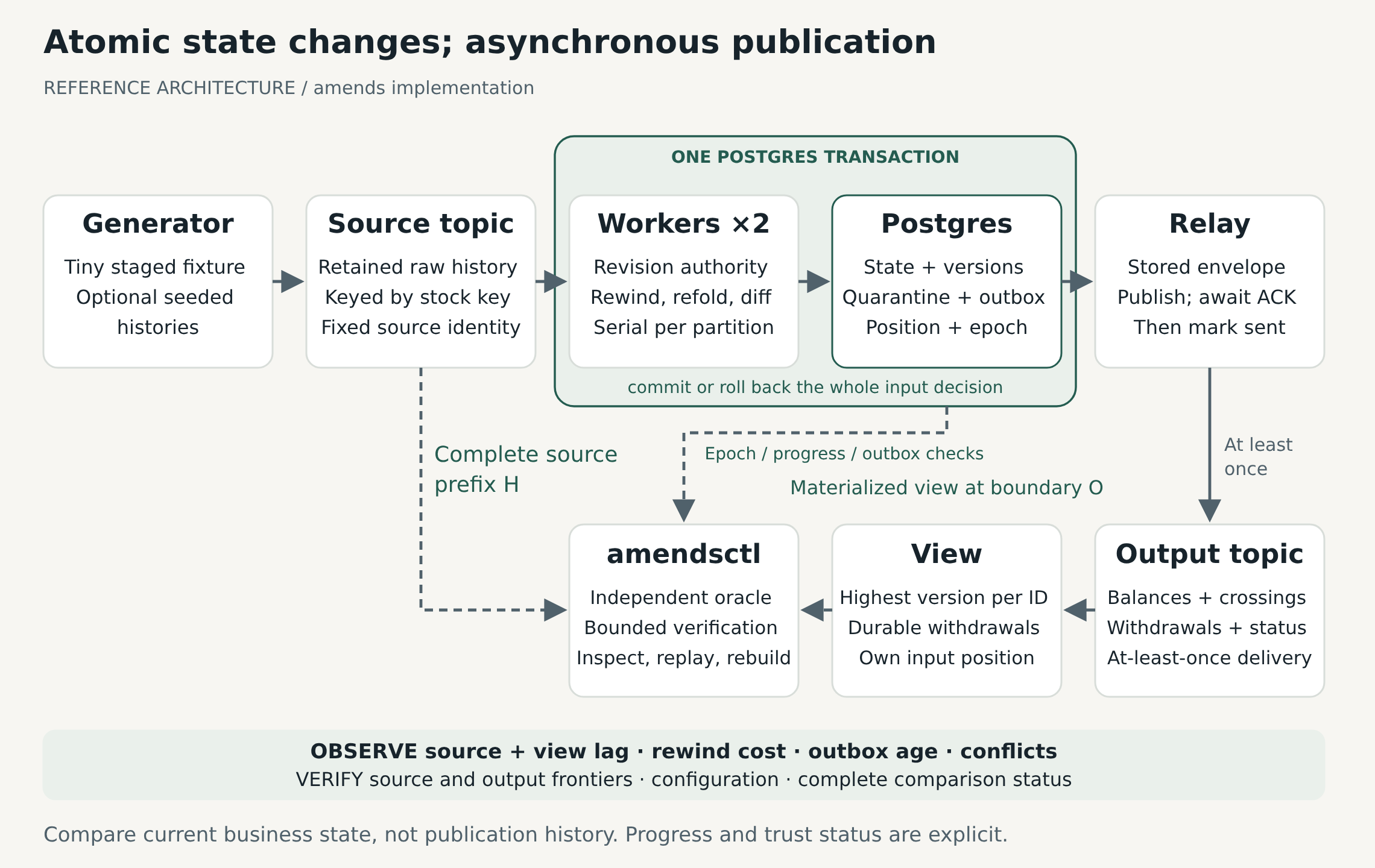
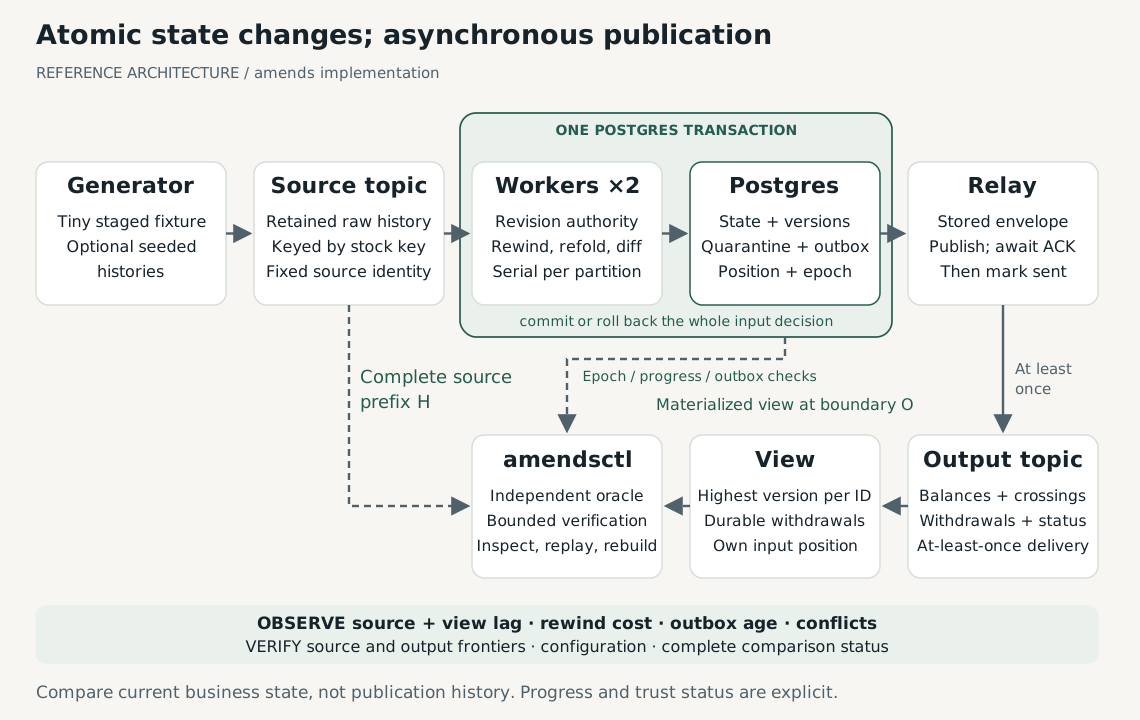
The illustration depicts the implemented reference architecture. One worker decision commits state, versions, quarantine, outbox, position, and epoch in PostgreSQL. Publication remains asynchronous and at least once. The view retains highest versions, withdrawals, and its own progress. Verification compares a complete retained source prefix with the view at a complete output boundary; worker metadata establishes that boundary, not the oracle's expected answers.
“View” includes the materializer process and durable state. Quarantine is part of the worker transaction, not a separate topic. The semantic contract defines the precise rules and design explains current responsibilities and limits. The SVG uses a fixed warm surface so its labels remain readable in either site theme. Edit it as the illustration source and render the PNG from that SVG at twice its 1140 × 720 viewBox dimensions; keep the separate Mermaid representation's boundaries aligned. No diagram-generation tool is required to build the site.
Core transcript
core-demo.txt is observed amendsctl core-demo output using Go 1.27.1 on Linux/amd64. It shows the original fixture, correction, and disappearing day in memory, with no SQL, broker, or process-crash evidence. Regenerate by running the command; never edit business values to fit an expectation.
Inventory comparison and recomputation
The homepage pairs original and corrected inventory charts. Both use a 0–120 unit scale and a dashed 60-unit threshold. Triangle markers and captions identify the crossing without relying on color. Lines connect discrete daily observations; they do not model intraday stock. The adjacent table and prose supply the complete explanation without JavaScript.
The chart data in assets/javascripts/inventory.js mirrors opening inventory and hand-derived fixture expectations. make docs-check compares those values, crossing days, and the accessible table against the original fixture files. The technical guide's refold diagram shows where recalculation begins and why it produces both updates and withdrawals. Its separate memory-path diagram describes code data flow; the architecture illustration above describes durable transaction and publication boundaries.
Browser libraries
| Library | Local browser bundle | License |
|---|---|---|
| Chart.js 4.5.1 | chart-4.5.1.umd.min.js | MIT |
| Mermaid 11.12.1 | mermaid-11.12.1.min.js | MIT |
These bundles come from the corresponding versioned packages at the npm registry, with package tarballs checked against the registry's SHA-512 dist.integrity. They require no Node build step or runtime CDN. Source-map URL comments are omitted because maps are not shipped. To update, download the chosen package version, verify its integrity, extract the browser bundle and license, update references, and repeat make docs-check and the browser checks in testing.
Chart.js loads on the first page containing inventory canvases; Mermaid loads when Material first renders a diagram. Prose-only visits load neither bundle. Small local scripts preserve initialization after instant navigation and reuse each library once loaded. mermaid-loader.js supplies the initialize/render interface used by Material 9.7.7, retaining Material's diagram styling and preventing its CDN fallback. Check those calls when upgrading Material. The architecture illustration is a static SVG and needs neither library.
SHA-256 of the served bundles: